How to Write AI Image Prompts? 16 Practical Templates and Optimization Techniques from PixPix
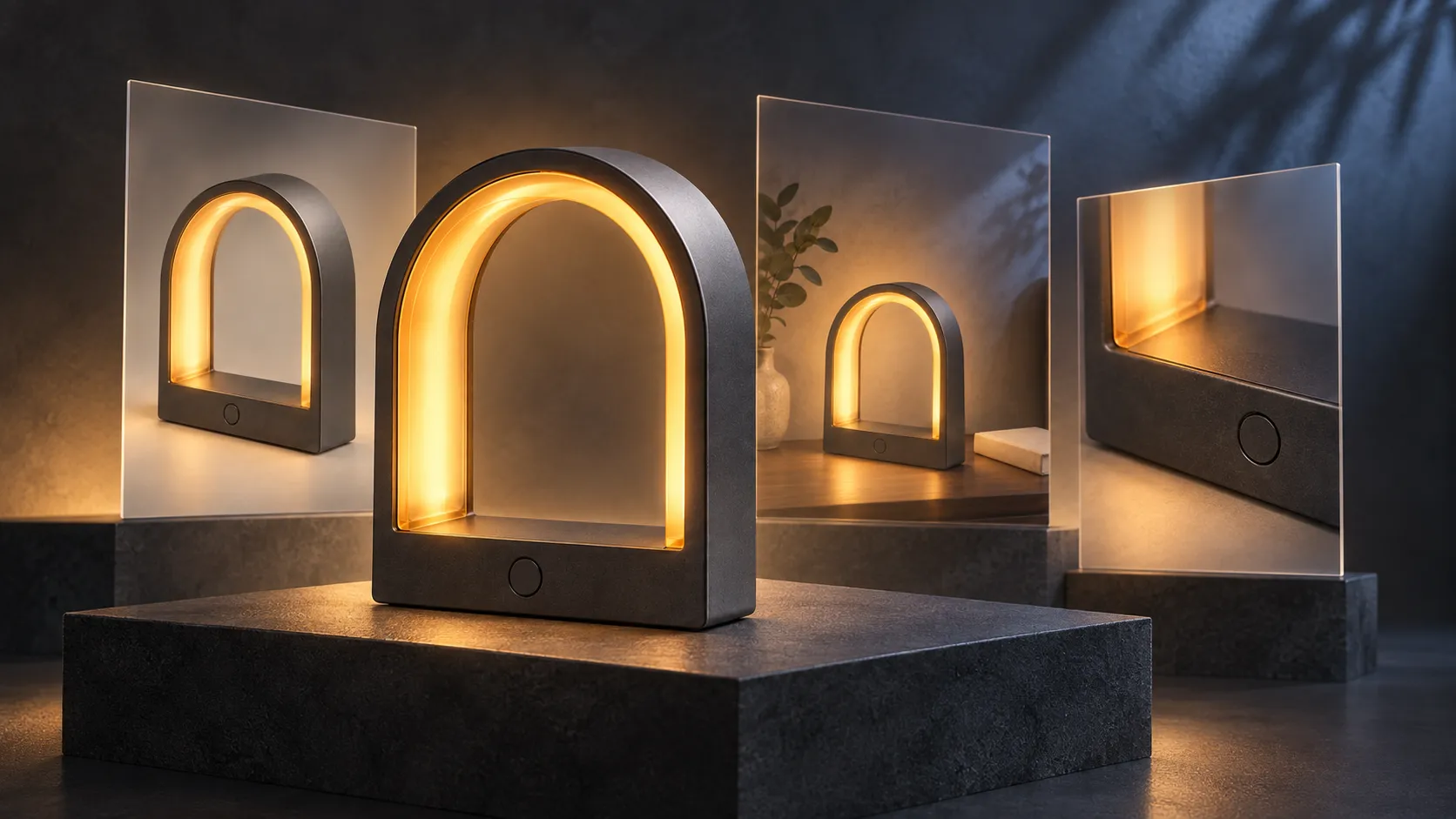
What AI image prompts really aim to address isn’t “how to write longer descriptions,” but rather how to transform ideas in your mind into clear, verifiable visual requirements. Who is the subject, where is it located, how should the camera frame the scene, where does the light come from, and which details must be preserved—when this information is more precise, the generated result becomes easier to evaluate and further refine.
This article compiles a set of prompt-writing techniques suitable for PixPix, offering 16 original examples across portrait, product, marketing visuals, interiors, food, illustration, sci-fi, and retro styles. All prompts are general templates or instructional examples—not the original prompts from reference articles—and do not represent actual test results from specific models.
Quick conclusion: Start with visual decisions, then add stylistic adjectives.
A practical and easily modifiable AI image prompt can begin with these seven elements:
Purpose and aspect ratio + Subject and action + Environment and spatial relationships + Lens and composition + Lighting + Style and materials + Elements that must be retained or excluded
You don’t need to fill all seven items every time. First list the requirements that truly shape the image, then remove redundant, conflicting, or invisible descriptors.
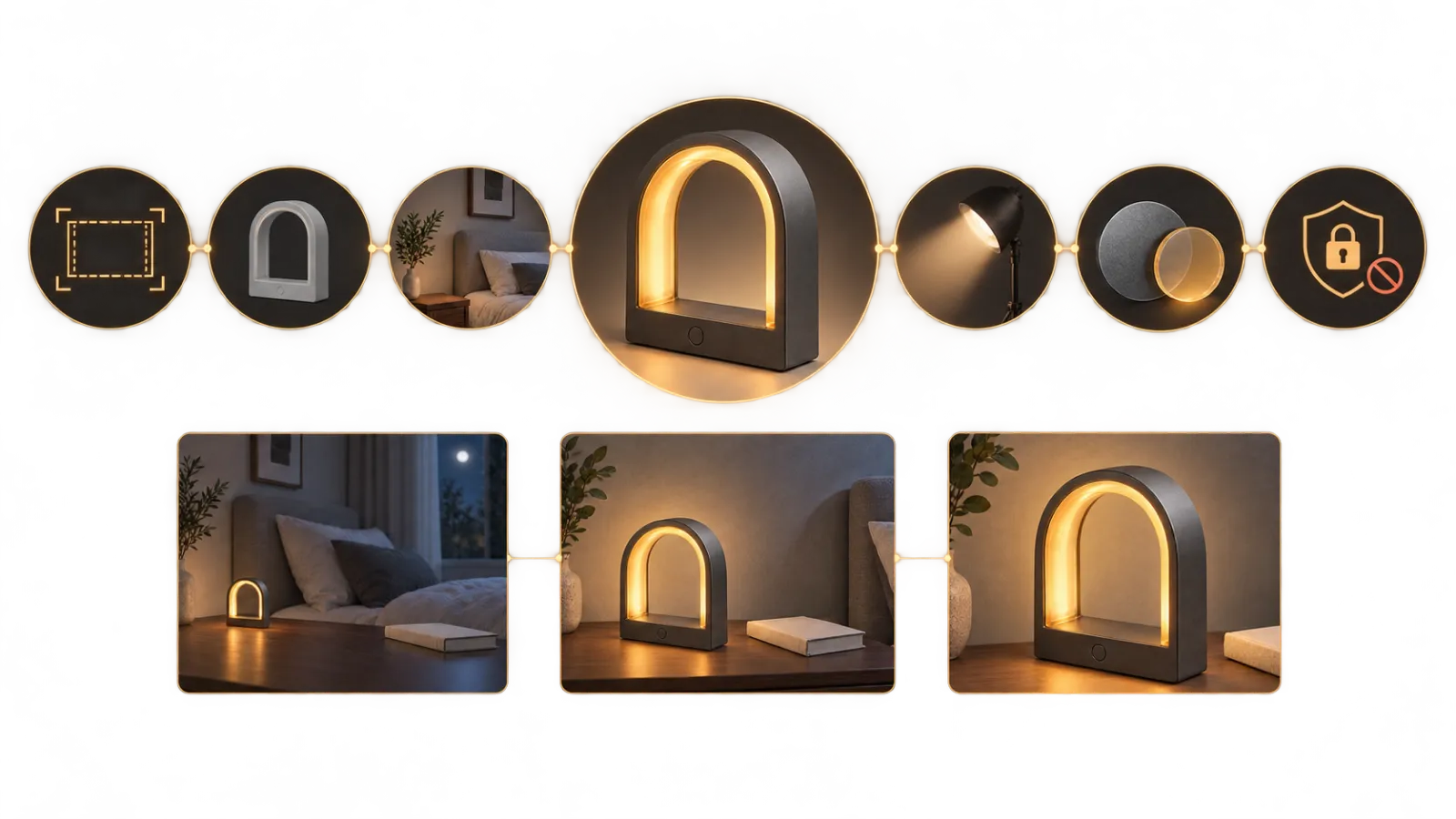
Caption: The seven graphic nodes above break down the prompt into purpose, subject, environment, composition, lighting, materials, and constraints; below, three example outputs demonstrate the progression from problem formulation to structured generation and single-variable adjustments.
For instance, “Generate a very high-end lamp” lacks verifiable visual details. It could instead be rephrased as:
Original example prompt
A 4:5 vertical product advertisement. The main subject is an arched, portable ambient lamp with a matte graphite-gray metal body, featuring a translucent amber-colored light strip embedded inside. On the front of the base sits a single circular touch button. The product stands vertically at the center of a dark gray stone tabletop, shot from slightly above, using broad soft light from the right front and warm contour lighting from the left rear. This modern, high-end commercial product shoot preserves ample space at the top of the frame while excluding people, logos, cords, or other lamps.
This description breaks down “high-end” into product structure, materials, lens choice, lighting direction, and empty space within the frame, making each element easy to verify after generation.
What information makes up a good prompt?
The subject and action answer the question: “What’s in the frame?”
Don’t just say “woman,” “car,” or “coffee.” Add details about identity, appearance, material, condition, and actions that influence the image.
Vague description | More actionable description |
|---|---|
A woman | A short-haired woman around thirty, wearing a dark gray wool suit, casually adjusting her cuff on the side |
A pair of sneakers | Cream-white mesh running shoes with a translucent rubber outsole and naturally drooping laces |
A cup of coffee | An iced oat milk latte in a transparent low cup, with condensation on the glass walls and perfectly formed milk foam on top |
If the subject comes from a real product or a fixed character, relying solely on text may make it difficult to consistently recreate their identity. In such cases, upload reference images and clearly specify unchangeable attributes like appearance, color, materials, text, and accessories.
The environment and spatial relationships answer the question: “Where is the subject?”
“Inside a room” doesn’t specify the type of room or the distance between the person and windows, furniture, or background. Instead, you could describe it as: “Sitting on a light-wood bench to the right of a floor-to-ceiling window, with a cloudy coastal view outside and a softly blurred small round table in the foreground.”
Spatial relationships matter more than simply listing props stacked together. When the relationships among the subject, supporting surface, foreground, and background are clear, the composition feels less cluttered.
Composition answers “what does the audience see first?”
You can directly specify:
Close-up, half-length, medium shot, full-body, or wide-angle long shot;
Eye-level, overhead shot, low-angle shot, or a view straight down from above;
Centered composition, rule of thirds, symmetrical layout, or negative space composition;
The size, orientation, and cropping range of the subject within the frame.
It is recommended to choose the aspect ratio based on the final intended use: 1:1 suits square social media content, 4:5 fits vertical feed posts, 9:16 works well for full-screen vertical content, and 16:9 is ideal for blog covers and banners. The specific available ratios should still be confirmed according to the current model interface.
Lighting answers “where does the sense of depth come from?”
Replace “cinematic lighting” with observable descriptions: whether light enters from the left or right side, if it’s soft or hard, warm or cool, and what kind of highlights and shadows it creates.
For example:
Soft window light enters from the left side of the frame, creating subtle shadows on the right cheek of the subject; the background is one brightness level darker than the subject, while the eyes retain natural highlights.
Style and materials answer “what medium will the finished image resemble?”
First select a primary style—such as commercial photography, documentary photography, watercolor illustration, 3D rendering, or paper-cut collage—and then add details about materials and colors. Including both “realistic photography, oil painting, watercolor, anime, and 3D rendering” in a single prompt often causes conflicting visual directions.
Constraints answer “what must remain unchanged?”
Constraints should address actual risks rather than mechanically adding a long list of generic negative terms.
For people: face shape, age, hairstyle, clothing, accessories, and body proportions;
For products: outline, color, material, labels, bottle caps, and the position of interfaces;
For posters: accurate text, text placement, subject留白 (negative space), and safe margins;
For spaces: location of doors and windows, relationships between walls, furniture dimensions, and circulation paths.
Choosing the correct generation path in PixPix
PixPix’s currently public page offers text-to-image, image-to-image, and image editing functions. Text-to-image is suitable for exploring new concepts from scratch; image-to-image allows you to upload reference images, sketches, or screenshots, enabling structure, composition, or style to influence the output; image editing is ideal for local retouching, enlarging images, replacing backgrounds, and enhancing image quality. Specific supported features may change with updates to the model and interface, so please refer to the current working platform.
Task | Suggested path | Key points of the prompt |
|---|---|---|
Design characters, scenes, or fictional products from scratch | Text-to-image | Specify the subject, composition, lighting, and style |
Preserve the real identity of products or individuals | Image-to-image or reference-image generation | Clearly defined parts that must be preserved and those allowed to change |
The main subject is usable, but the background or certain areas contain errors | Image editing | Only describe changes within the selected area while preserving surrounding content |
Composition is correct, but the output size is insufficient | High‑resolution enlargement | First confirm the structure, then check the enlarged edges and textures |
Do not leave the entire composition entirely up to the prompt. First select a proportion on the generation interface that closely matches the final intended use, then let the prompt handle the placement of the main subject and the amount of negative space.
Original case: Turning a vague request into a usable prompt
This case uses an original fictional product called the “ArcLight Portable Ambient Lamp.” It features four fixed identifying characteristics: an arched graphite‑gray body, a translucent amber light strip, a circular touch button on the front, and a minimalist base without any logo.
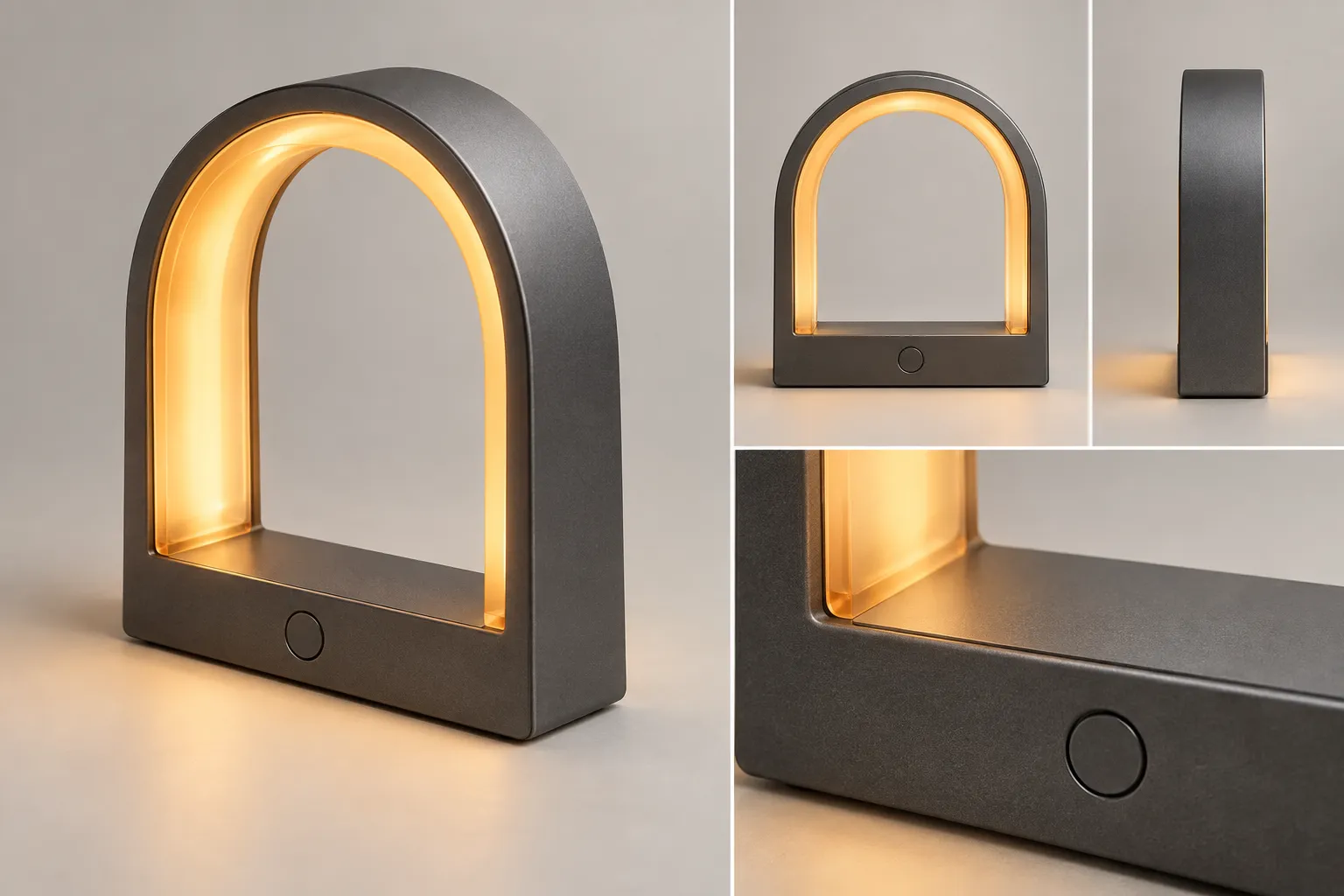
Caption: The product’s master design first locks in the arched proportions, graphite‑gray metal finish, amber light strip, and circular buttons; subsequent scenes only vary the environment, composition, or camera distance.
Version 1: Only a concept, no visual structure
Instructional prompt for teaching purposes
A futuristic portable lamp placed in a high‑end interior setting, creating a strong atmosphere.
This prompt fails to define the lamp’s structure, subject proportion, spatial type, lighting direction, or intended purpose. Even if the result looks appealing, it remains difficult to determine what needs adjusting next.
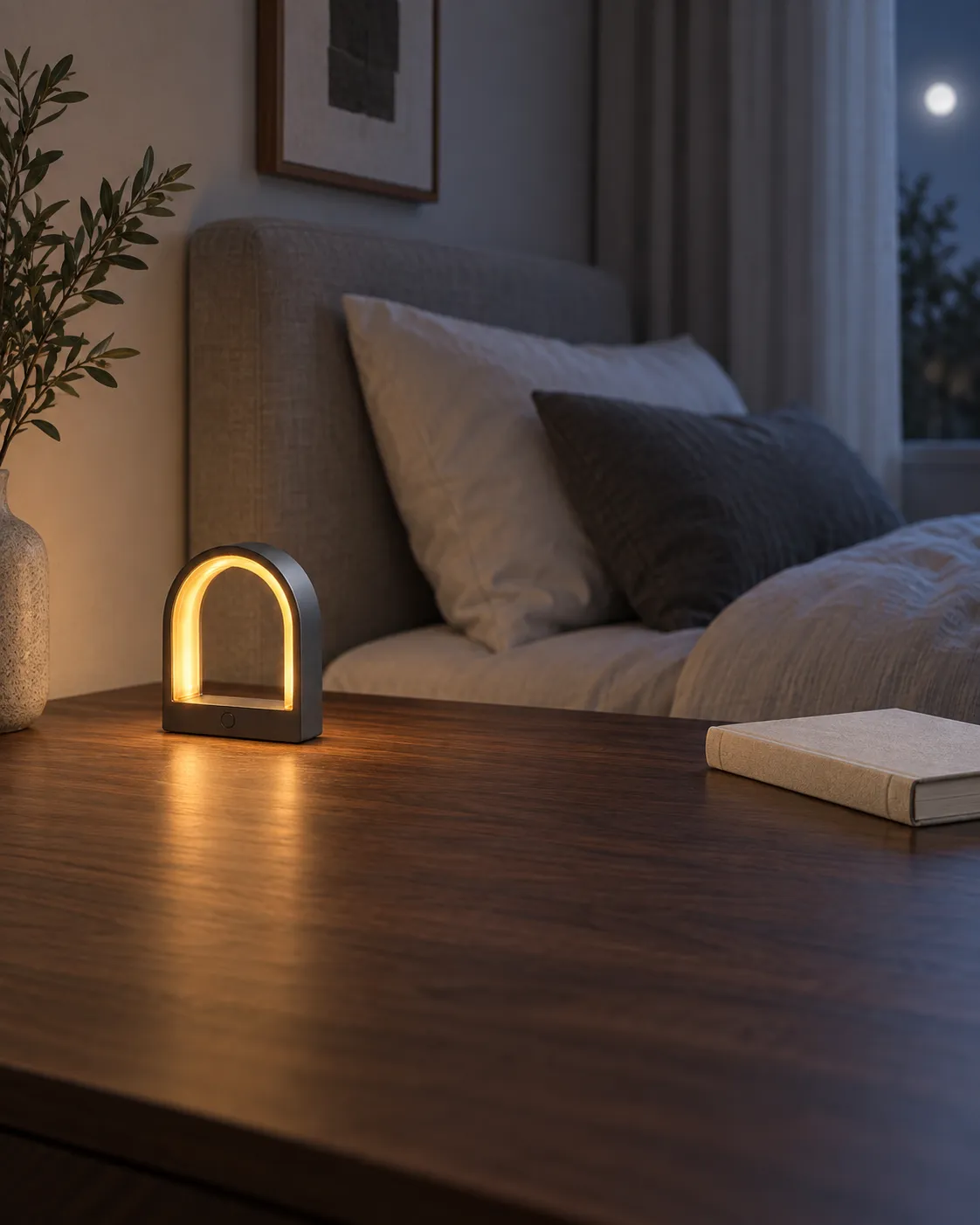
Caption: Although the product itself remains recognizable, the main subject is too small, with excessive foreground elements on the table, causing viewers to notice the room rather than the ambient lamp at first glance.
Version 2: Adding missing elements—subject, space, camera angle, and lighting
Original example prompt
A 4:5 vertical lifestyle advertisement. Retain the arched graphite‑gray metal body, translucent amber light strip, circular touch button on the base, and logo‑free design. Place the ambient lamp to the left of a dark walnut bedside table, with a closed off‑white cloth book on the right side, against a warm gray micro‑cement wall. Position the camera level with the product, ensuring the lamp occupies approximately one third of the frame’s height. The light strip emits soft amber light, creating a subtle halo effect on the wall, while faint cool moonlight provides supplementary illumination on the right side. Capture authentic indoor lifestyle photography, leaving ample layout space at the top and upper right, avoiding figures, wires, or other fixtures.
Now you can examine each element—product structure, positioning, proportions, lighting, and negative space—rather than simply judging whether “there’s an atmosphere.”
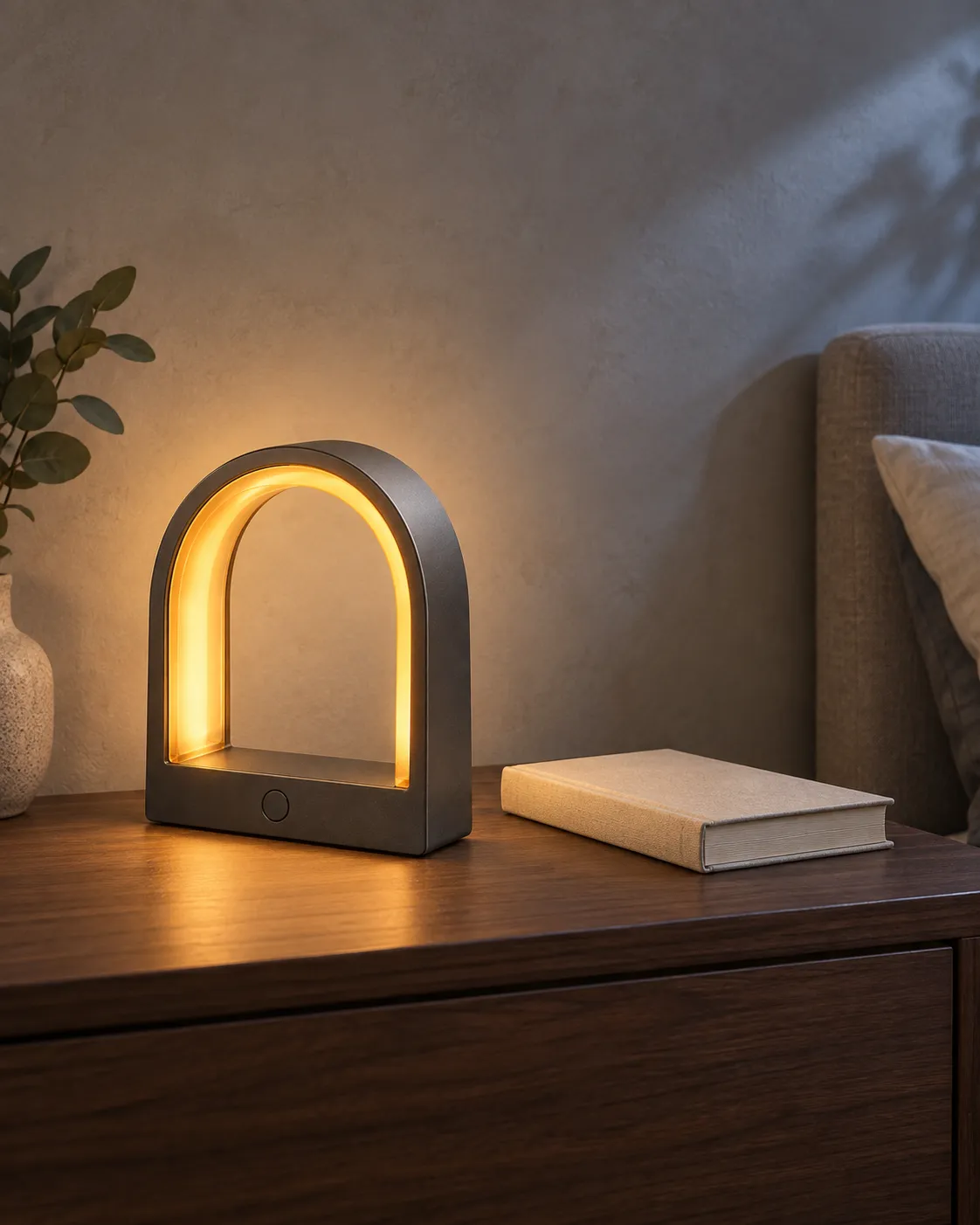
Caption: A structured prompt clearly defines the product’s position, subject proportion, relationship with the book, wall material, amber main light, and cool supplementary lighting, making the image easier to review and further refine.
Version 3: Adjusting only one major variable
If the subject in Version 2 appears too small, avoid simultaneously altering style, background, or lighting. Instead, adjust only the camera distance:
General correction prompt
Simply move the camera closer to the product, increasing the ambient lamp’s share of the frame to about half; keep the product’s structure, colors, materials, bedside table, book placement, light direction, background, and overall style unchanged.
Single-variable adjustments make it easier to determine whether a prompt is effective and also reduce the likelihood of already established elements being reinterpreted.
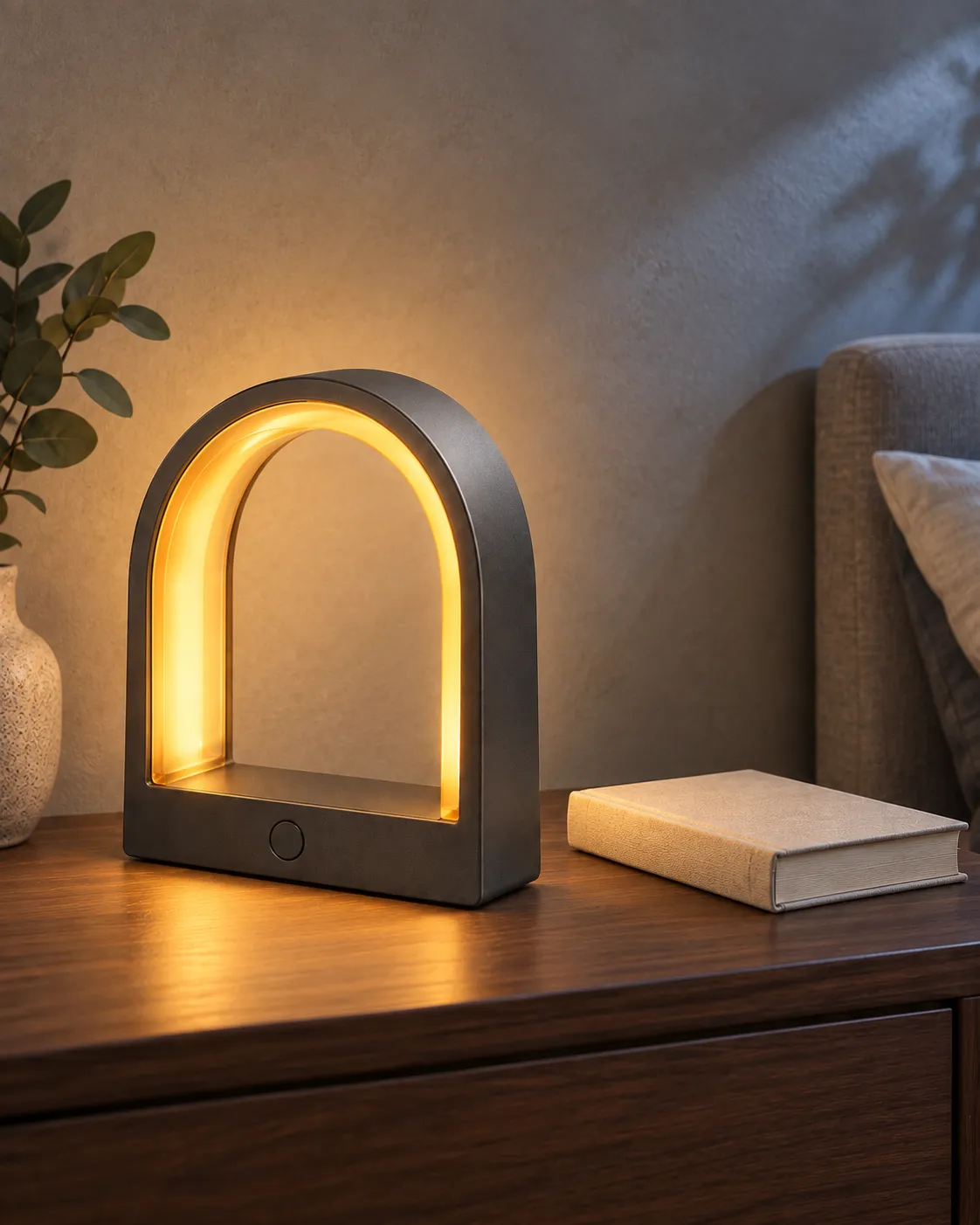
Caption: In the revised version, only the camera is moved closer, increasing the product’s height from about one-third of the frame to nearly half; the product, tabletop, books, background, and lighting direction remain consistent.
16 AI Image Prompt Templates Ready for Direct Modification
The examples below are organized by common usage scenarios. It is recommended to replace the subject, colors, position, and purpose rather than simply copying entire segments in hopes of achieving identical results.
Portraits and Headshots
General Template | Natural Professional Headshot
〖Person’s Age and Appearance〗, wearing 〖Clothing〗, facing the camera with 〖Expression and Pose〗, against a backdrop of 〖Environment〗. 〖Shot Type and Camera Position〗, illuminated by 〖Lighting Direction〗, preserving natural skin texture and catchlights, overall in a 〖Photographic Style〗, without any 〖Disturbing Elements〗.
Original Example Prompt | Portrait Editing by the Window
A magazine editor in her thirties from East Asia, with short black hair cut at chin level, wearing a charcoal-gray knit top, seated on the right side of a large window, slightly turning her head toward the camera. A bust-shot composition, with soft overcast light streaming in from the left, leaving natural shadows on the right cheek, against a subtly blurred bookshelf backdrop. A restrained editorial portrait, capturing real pores, fine expression lines, and natural strands of hair, without retouching or exaggerated jewelry.
Product and E-commerce Visuals
General Template | Single-Item Studio Shoot
The 〖Product Name〗 features 〖Structure, Color, and Material〗, placed in a specific position on a 〖Support Surface〗. Using an appropriate 〖Camera Angle〗 and 〖Composition〗, the main light enters from a particular 〖Direction〗, creating distinct 〖Highlights and Shadows〗. Overall in a 〖Commercial Photography Style〗, maintaining all 〖Unchangeable Product Details〗, without any 〖Disturbing Objects〗.
Original Example Prompt | Translucent Earphone Case
A translucent smoky-gray wireless earphone charging case, with rounded rectangular edges, revealing faint silhouettes of silver earphones inside, placed centrally on a light gray frosted acrylic surface. A three-quarter overhead close-up shot, with a narrow band of hard light outlining the case’s edge on the right rear, while a broad area of soft light controls reflections on the left front. Modern consumer electronics commercial photography, with a clean background, preserving transparent materials, hinge proportions, and contact shadows, without brand logos, phones, or charging cables.
Marketing Posters and Social Media Visuals
General Template | Poster with Text Space
Create a poster for an 〖Event or Product〗 with a specific 〖Proportion〗, placing the main subject in a designated 〖Position〗 that occupies approximately 〖Proportion〗 of the frame, while leaving ample clean layout space in another 〖Position〗. Use a defined 〖Color Palette〗, 〖Lighting〗, and 〖Graphic Language〗; the required text should read “〖Accurate Text〗,” positioned in a specified location, without adding any additional text or logos.
Original Example Prompt | Summer Bubble Drink
A vertical 4:5 summer social media ad. A glass of clear yuzu bubble drink sits at the lower-right third of the frame, with ice cubes and tiny bubbles clearly visible, and natural condensation forming on the outside of the glass; a large expanse of pale yellow layout space remains in the upper-left corner. The background uses a gentle gradient from coral orange to lemon yellow, with sunlight on the right casting a distinct glass shadow. A refreshing modern beverage photograph, displaying only the text “Refreshing Summer,” positioned in the upper-left corner, without English, subtitles, logos, or extra fruit.
Architecture and Interior Spaces
General Template | Interior Space
The 〖Space Type〗 adopts a specific 〖Design Style〗, incorporating 〖Main Materials〗, 〖Key Furniture〗, and 〖Fixed Structures〗. Viewed from a designated 〖Camera Position〗, using appropriate 〖Lighting and Time〗, it presents the 〖Spatial Atmosphere〗. Maintain the 〖Unchangeable Doors, Windows, and Layout〗, without adding unnecessary furniture or decorations.
Original Example Prompt | Seaside Reading Room
A small reading room facing the coast, with light oak walls, off-white linen benches, and a deep blue wool carpet. Floor-to-ceiling windows are positioned directly ahead, while a set of built-in bookshelves occupies the left side. The camera is placed at the center of the entrance, shooting from a low angle with a wide field of view but without exaggerated distortion. On an overcast day, natural light streams in through the floor-to-ceiling windows, maintaining a soft, neutral brightness indoors. A quiet architectural magazine-style photograph, keeping the window, entrance, and bookshelf positions unchanged, without adding televisions, dining tables, or human figures.
Food and Lifestyle
General Template | Menu Main Image
〖Dish or Beverage〗is presented on 〖Plating Style〗 atop 〖Utensils and Surfaces〗, surrounded only by 〖Minimal Garnishes or Props〗. Shot from 〖Angle〗, with 〖Lighting〗 coming from 〖Direction〗 to emphasize 〖Ingredient Textures〗, resulting in an overall 〖Culinary Photography Style〗.
Original Example Prompt | Citrus Tart
A blood orange almond tart approximately twelve centimeters in diameter, its cross-section revealing a crisp crust, almond cream, and translucent orange slices, arranged at the center of a matte off-white ceramic plate. Shot from a three-quarter overhead angle, with soft window light on the left highlighting the crust’s texture, and a small warm-toned reflector providing fill light in the rear right. Set against a light gray stone tabletop, accompanied only by a slender dessert fork. A naturally elegant dessert menu photograph, avoiding flowers, whole fruits, text, or human hands.
Illustration and Anime Visuals
General Template | Narrative Illustration
〖Character or Subject〗is engaged in 〖Action〗 within 〖Scene〗, with 〖Elements〗 in the foreground and 〖Elements〗 in the background. Employing 〖Composition and Perspective〗, 〖Color Palette〗, and 〖Painting Medium〗, ensure that the 〖Visual Focus〗 is immediately apparent, while preserving the 〖Character’s Identifying Features〗.
Original Example Prompt | Night Shift Train Attendant
A young train attendant in dark green uniform carries a brass hand lamp as he inspects train doors along the platform of a rainy mountain station. Shot from a low-angle medium shot, with wet rails and scattered white wildflowers in the foreground, and a parked deep red vintage train against a backdrop of misty pine forests. Using an indigo, deep red, and warm gold color palette, evoking a delicate two-dimensional animated film aesthetic; maintaining consistent black short hair, round glasses, a brass hand lamp, and golden buttons on the uniform, while excluding modern billboards or other human figures.
Concept Art and Fantasy Scenes
General Template | World-Building Scene
〖Location or Subject〗possesses 〖Key World-Building Elements〗, with a 〖Scale Reference〗 in the foreground, 〖Main Action〗 unfolding in the midground, and 〖Environmental Scale〗 visible in the background. Utilizing 〖Light Sources〗, 〖Color Palettes〗, 〖Shot Sizes〗, and 〖Artistic Media〗, emphasize the 〖Core Visual Focus〗.
Original Example Prompt | Tidal Library
A tidal library built inside a massive sea cave, with arched bookshelves climbing up the rock wall, a central stone staircase exposed after low tide, and a few readers carrying warm-lit hand lamps as they wade through shallow water. In the foreground, reflections shimmer on the water surface alongside seashells; in the midground, a bronze door leads into the library’s reading hall; in the distance, the cave’s opening reveals a blue-green sea. Shot with an ultra-wide lens, contrasting cool blue ambient lighting with warm golden highlights, this cinematic concept art emphasizes spatial scale and the central bronze door, while excluding modern electronic screens or urban architecture.
Science Fiction and Futuristic Visions
General Template | Technological Scene
〖Future Subject or Location〗contains 〖Specific Technological Structures〗 and is undergoing 〖Major Actions〗. Light sources originate from 〖Clearly Defined Devices〗, creating 〖Reflections or Shadows〗 on 〖Surfaces〗. Employing 〖Primary and Secondary Colors〗, 〖Lens Composition〗, and 〖Visual Style〗, avoid merely describing a “neon futuristic vibe.”
Original Example Prompt | Desert Weather Station
A modular meteorological research station in the desert at night, composed of three white cylindrical modules and a set of folding solar panels, with an unmanned patrol vehicle returning along an arched trajectory to the entrance. Warm white maintenance lights shine from the entrance toward the sand surface, while cool blue status lights cast narrow reflections on the metallic exterior. In the distance, low dunes and a clear starry sky are visible, captured in a 16:9 wide-angle hard-science-fiction film frame, with the central research station as the focal point—no massive cities, weapons, or densely packed holographic displays appear.
Retro and Period Style
General Template | Period Photography
A photograph in the style of a specific era, featuring a subject such as a person or object, set within an environment appropriate to that period. Use period-appropriate clothing and props, lighting, color processing, grain or print textures, and framing techniques, ensuring all period details align coherently.
Original Example Prompt | 1980s Audio-Visual Store
A documentary-style photo of an urban audio-visual store from the late 1980s, showing a young shop assistant wearing a dark blue flight jacket standing among shelves of cassette tapes, bending down to affix price tags to tape cases. Fluorescent overhead lights lend a subtle greenish tint, while warm-toned desk lamps create localized contrasts. Captured with 35mm film grain, slightly faded print texture, and a medium shot composition taken at eye level; props limited to cassette tapes, paper price tags, and wired headphones, with no smartphones, modern payment codes, or LED billboards appearing.
How to Adapt Examples into Your Own Prompts
Replace nouns first, then visual relationships.
Simply substituting “perfume” with “headphones” is usually insufficient. The way the product is supported, its reflections, close-up emphasis, and usage context should also change accordingly. After replacing the subject, re-examine: how it should be arranged, from what angle it’s viewed, which material is most important, and what space needs to be left.
Address only one major issue per round.
It’s generally easier to manage if you follow this sequence:
Is the subject correct?;
Are the composition and subject proportion appropriate?;
Does the light direction and spatial relationship make sense?;
Are the materials, textures, and small details believable?;
Do the text, edges, and output size suit the intended delivery?;
If the subject is too small, adjust the lens distance first; if the background is incorrect but the subject is fine, prioritize editing the background locally; if the product’s shape has already changed, return to the original reference image rather than continuing with the mistaken result.
Save reproducible generation records.
Retain the final prompt, reference images used, model name, aspect ratio, and confirmed results. Even identical prompts may yield different compositions and details; keeping complete settings ensures easy iteration or reuse by team members.
PixPix also offers a public AI Image Prompt Library, where you can browse examples by category and initiate generation. Treat these prompts as starting points, but always re-examine them based on your own subject, purpose, and reference images.
Common Issues and Troubleshooting Methods
Problems | Priority Correction Methods |
|---|---|
Portrait skin resembling plastic | Reduce “perfect, flawless, ultra-smooth,” and increase natural pores, fine lines, skin tone variations, and a clear soft-light direction |
Each product or person becomes different | Upload the same reference image, and list item by item the structures, colors, clothing, and accessories that must be preserved |
The composition is too crowded | Retain one focal subject, reduce props, and clearly indicate which side should remain blank |
Spelling errors in the text | Shorten the copy, provide exact wording and placement within quotation marks; if errors persist, edit the text area separately |
The background is incorrect but the main subject is usable | Select only the background for localized adjustments, then check hair strands, product edges, reflections, and contact shadows after completion |
After exporting with a transparent background, residual color still appears | Verify whether the model used and the export format support transparency, and do not treat checkerboard patterns as genuine transparent channels |
Frequently Asked Questions
Is a longer prompt always better?
No. Prompts only need to cover visual decisions that affect the outcome. Redundant high‑end adjectives, conflicting styles, and invisible information can blur the focus. Simple compositions may be very short, while complex scenes benefit from breaking down subjects, settings, shots, and constraints into separate clauses.
Can Chinese prompts be used directly?
You can start with the language that most accurately conveys your intent. PixPix’s publicly available model pages also showcase examples of both Chinese and English prompts. If the results continue to misinterpret a particular description, try replacing it with a more specific synonym, and compare it against the actual output of the chosen model.
Why does copying the same prompt yield results different from the example?
Prompts are just one of many factors influencing the outcome. Model version, aspect ratio, reference images, parameters, and randomness all play a role. Examples should be viewed as visual guidelines rather than guarantees of identical results.
Can real products be faithfully recreated using text alone?
Text can generate fictional product concepts, but it’s difficult to consistently reproduce the exact contours, colors, structure, and labels of real-world items currently on sale. When product consistency is required, upload clear reference images and compile a checklist of unchangeable elements.
When should you make localized edits instead of regenerating entirely?
When the subject, composition, and lighting are already established, and only the background, hands, small props, or localized materials require adjustment, localized editing is usually more targeted. After editing, always double-check that selection edges, light direction, shadows, and the subject’s identity haven’t been inadvertently altered.
Summary
Practical AI image prompts aren’t collections of adjectives—they’re actionable visual briefs ready for execution and evaluation:
Clearly define purpose and aspect ratio → Specify the subject and action → Explain spatial relationships and composition → Indicate light source → Choose a single dominant style → List non‑modifiable elements → Review structure first → Make single-variable adjustments → Save final settings.
When starting generation in PixPix, begin with the template closest to your goal, swap out the subject and scene, then refine just one major variable based on the initial results. If your task involves real products, fixed characters, or existing spaces, incorporating reference images from the outset is far more effective than repeatedly adding descriptive adjectives.

AI Image Tool Built for E-commerce Teams
For new product launches, advertising, and promotional campaigns, use AI to generate product images, scene visuals, ad creatives, and short video assets — making content production faster.