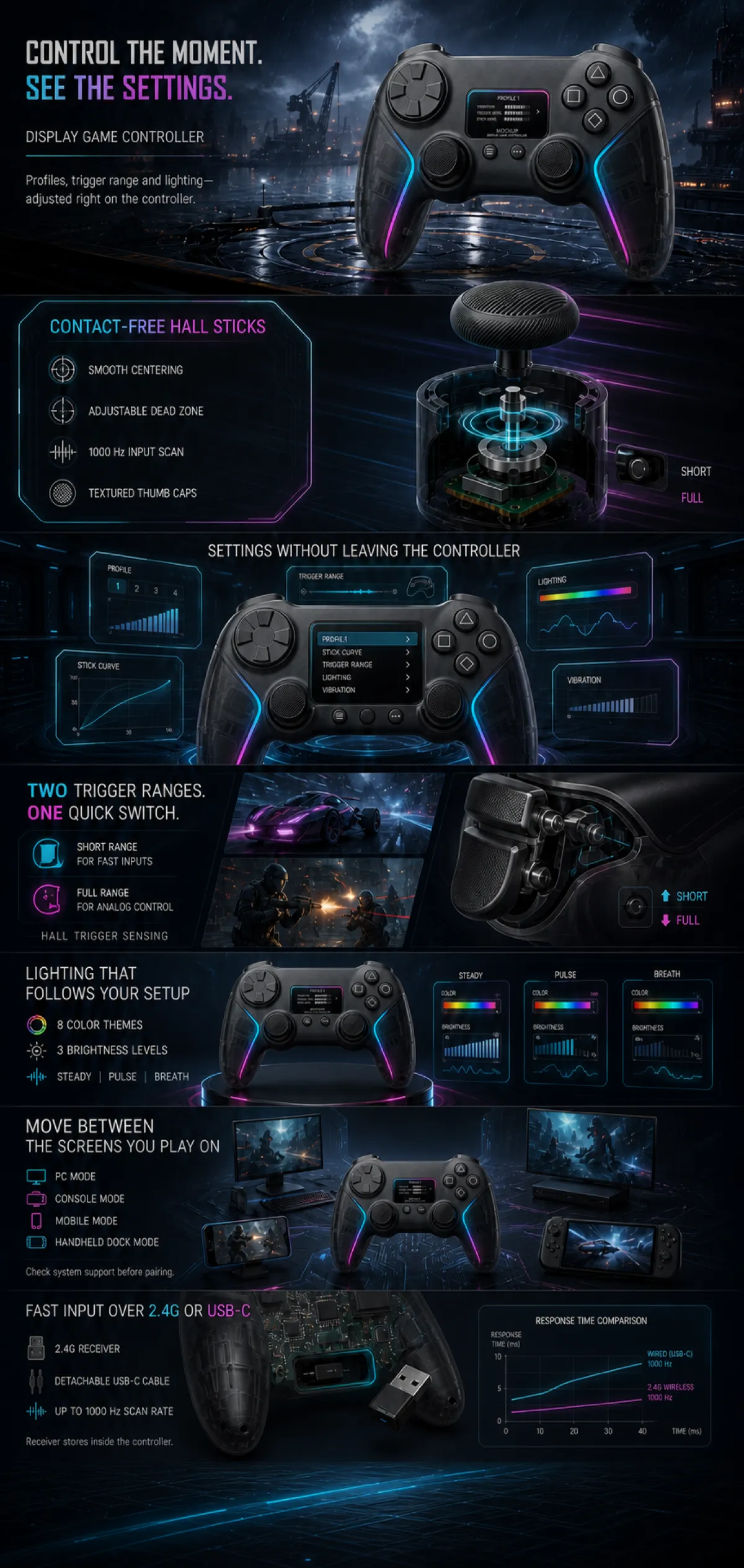
Create one complete vertical Amazon A+ preview image at 1200 px width with a naturally tall canvas. Use seven continuous modules with no white or near-white separator lines. Maintain a premium dark gaming-technology art direction using graphite black, smoky gray, cyan, magenta, and restrained electric violet. Every scene, UI panel, device silhouette, game image, icon, and graphic must be newly designed. Preserve a generous final 4% empty safe zone made only from the dark circuit-floor background and cyan light trails; place no text, product, icon, chart, or decorative focal object in that zone.
Use one consistent redesigned display game controller throughout: a wide flat butterfly silhouette, graphite center shell, translucent smoky grips, continuous cyan-to-magenta inner light strips, horizontal rounded OLED, two small round function buttons below it, symmetrical lower-position textured sticks, segmented circular D-pad at upper left, four unlabeled geometric buttons at upper right, top USB-C port, dual triggers with short/full travel selectors, rear buttons, and a receiver storage slot. Keep the controller proportions, controls, materials, lighting strips, and geometry identical in every appearance and angle. Do not stretch or deform the product. Use only “MOCKUP” and “DISPLAY GAME CONTROLLER” as product naming.
Module 1, approximately 17% height: a cinematic rain-soaked cyber harbor at night with the controller large and dominant on a wet circular platform. Place left-aligned editorial copy with strong cyan and magenta emphasis: “CONTROL THE MOMENT. SEE THE SETTINGS.”, “DISPLAY GAME CONTROLLER”, and “Profiles, trigger range and lighting—adjusted right on the controller.”
Module 2, approximately 14% height: a transparent exploded Hall-stick mechanism on the right and a framed data panel on the left. Use the exact copy “CONTACT-FREE HALL STICKS”, “SMOOTH CENTERING”, “ADJUSTABLE DEAD ZONE”, “1000 Hz INPUT SCAN”, and “TEXTURED THUMB CAPS”. Show the selector labels “SHORT” and “FULL” clearly and without extra characters.
Module 3, approximately 13% height: center the controller and surround it with five curved futuristic UI panels. Use the headline “SETTINGS WITHOUT LEAVING THE CONTROLLER” and the exact menu labels “PROFILE”, “STICK CURVE”, “TRIGGER RANGE”, “LIGHTING”, and “VIBRATION”.
Module 4, approximately 14% height: show a transparent trigger assembly on the right and two newly designed racing and action game windows on the left. Use “TWO TRIGGER RANGES. ONE QUICK SWITCH.”, “SHORT RANGE FOR FAST INPUTS”, “FULL RANGE FOR ANALOG CONTROL”, and “HALL TRIGGER SENSING”.
Module 5, approximately 12% height: present the controller on a dark illuminated stage with cyan-magenta trails and three compact lighting-control panels. Use “LIGHTING THAT FOLLOWS YOUR SETUP”, “8 COLOR THEMES”, “3 BRIGHTNESS LEVELS”, “STEADY”, “PULSE”, and “BREATH”.
Module 6, approximately 12% height: arrange the controller at center with four generic, unbranded device silhouettes for desktop, console, mobile, and handheld-dock use. Use “MOVE BETWEEN THE SCREENS YOU PLAY ON”, “PC MODE”, “CONSOLE MODE”, “MOBILE MODE”, “HANDHELD DOCK MODE”, and “Check system support before pairing.”
Module 7, approximately 14% height: show the rear receiver-storage structure, a generic 2.4G receiver, detachable USB-C cable, chipset detail, and a clean response-time chart. Use “FAST INPUT OVER 2.4G OR USB-C”, “2.4G RECEIVER”, “DETACHABLE USB-C CABLE”, “UP TO 1000 Hz SCAN RATE”, and “Receiver stores inside the controller.” Continue the dark circuit floor downward into the empty bottom safety zone.
Keep all copy legible and correctly spelled. Do not include original or invented brands, device logos, ABXY letters, official compatibility marks, certifications, medical or authority claims, “500M”, absolute no-drift claims, prices, calls to action, shopping UI, pagination dots, module labels, filenames, dimensions, placeholder text, or gibberish. Do not add white separators or crop the last module.